Rocket.Chat is built on Node.js and requires a compatible MongoDB database. This guide explains how to check which versions of both are supported for your Rocket.Chat release.
If you deploy using the recommended methods, Node.js is managed automatically, and you don't need to track its version. You only need to check Node.js when debugging rare issues or when using a manual installation, which is not recommended. MongoDB is different: keeping your database on a supported version is your responsibility and must be actively managed as you upgrade Rocket.Chat over time.
Keep the following in mind about MongoDB support:
Supported MongoDB versions are defined per release and can change across major versions. Refer to the MongoDB version requirements for the full list.
A MongoDB version scheduled for removal is deprecated first. As a workspace admin, you see a deprecation warning in your Rocket.Chat logs and a notice banner on your workspace.
Rocket.Chat defines the compatible Node.js and MongoDB versions for each release. You can retrieve this information from the GitHub release notes or from the releases API. Select a tab to view the method you prefer:
Using GitHub release notes
Go to the Rocket.Chat releases page.
Select your target Rocket.Chat version (for example, 8.1.0 or 8.2.0). Alternatively, use the following template link, replacing
<VERSION>with your target release number:https://github.com/RocketChat/Rocket.Chat/releases/<VERSION>Locate the Engine versions section, which lists all the version requirements in one place.
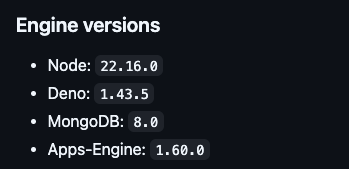
From here, you can identify the compatible Node.js and MongoDB versions for your release.
Using the releases API
This method is faster and is particularly useful when you need to retrieve version information programmatically, for example, in a script or an automation pipeline.
Run the following command in your terminal, replacing <VERSION> with your target release number:
curl -s https://releases.rocket.chat/<VERSION>/infoFor example, to check version 8.2.0:
curl -s https://releases.rocket.chat/8.2.0/infoThe command returns a JSON response similar to this (formatted for readability):
{
  "tag": "8.2.0",
  "commit": "f2a05ceed2086266fa3e36cf575c1794f68f00ab",
  "key": "build/rocket.chat-8.2.0.tgz",
  "etag": "6a13ead87a64cfae66037e5cac9c8f0b-33",
  "count": 1201,
  "nodeVersion": "22.16.0",
  "denoVersion": "1.43.5",
  "compatibleMongoVersions": [
    "8.0"
  ],
  "lts": false
}
The two fields to check are nodeVersion and compatibleMongoVersions.
If your MongoDB version is not supported for the release you are targeting, upgrade MongoDB before updating Rocket.Chat. The Deploy with Docker and Docker Compose guide includes steps to update MongoDB to a compatible version.