.svg)
Permission Model Consideration
Federation operates across different permission models. Rocket.Chat uses a role-based permission system, while Matrix relies on power levels to define user capabilities within rooms. Due to the lack of a direct mapping between these models, changes to roles and permissions in Rocket.Chat may not be consistently reflected in federated rooms. This can result in unexpected behavior in certain scenarios, particularly when permissions are dynamically updated. It is recommended to validate permission changes carefully when operating in federated environments.
Overview
Federation in Rocket.Chat enables organizations to securely collaborate across independent workspaces while maintaining full control over their data and infrastructure.
Introduced in version 7.11, Federation is Rocket.Chat's built-in implementation of the Matrix protocol. Unlike earlier versions that depended on an external Synapse homeserver, Federation:
Runs natively inside Rocket.Chat.
Requires no external services or additional databases.
Built on the Matrix protocol, Rocket.Chat enables secure and interoperable collaboration across federated networks for teams, partners, and external organizations.
Benefits of Federation
Federation uses the Matrix protocol to enable secure, decentralized, and interoperable communication between independent workspaces.
Federation is ideal for organizations that need:
Business need | How Federation helps |
|---|---|
Data sovereignty & security | Each workspace maintains full ownership of its data. Messages, files, and room state are stored locally and shared only when necessary, allowing for secure cross-organization communication without compromising control to third-party servers. |
Access control | Access to federated communication in Rocket.Chat is currently controlled through workspace permissions. Users must be explicitly granted the |
Built-in homeserver, no external components | Federation runs directly inside Rocket.Chat, simplifies deployment and removes the need for external Synapse servers, extra databases, or standalone components. |
Lower total cost of ownership (TCO) & reduced complexity | Organizations using traditional federation stacks often manage multiple external components, such as a Synapse Python server paired with a dedicated PostgreSQL database. Federation eliminates this multi-component architecture, reducing maintenance overhead, operational complexity, and long-term infrastructure costs. |
Guaranteed performance baseline | Because the homeserver is built directly into Rocket.Chat, the platform can optimize performance holistically. Federation is designed to achieve high SLA targets with minimal resource consumption, providing predictable performance without the heavy footprint of external homeserver deployments. |
Cross-organization collaboration | Teams can communicate with external partners, vendors, agencies, or customers while keeping their internal workspace separate and secure. Federated rooms allow distributed groups to collaborate seamlessly. |
Interoperability through open standards | Built on the Matrix protocol, Federation supports communication between Rocket.Chat and other Matrix-based platforms, ensuring long-term compatibility and flexibility. |
Independent infrastructure | Each server operates as its own autonomous system. If one workspace goes offline or loses connectivity, other servers continue operating without disruption. |
Future-proof collaboration | As Matrix evolves, federation capabilities will continue expanding, bringing more secure and interoperable features to Rocket.Chat. |
Architecture preview
Federation in Rocket.Chat is powered by an embedded Matrix homeserver that runs directly inside the Rocket.Chat application. Instead of relying on an external Synapse server, Rocket.Chat now acts as its own federation engine, allowing workspaces to communicate securely and independently. At a high level, the architecture works as follows:
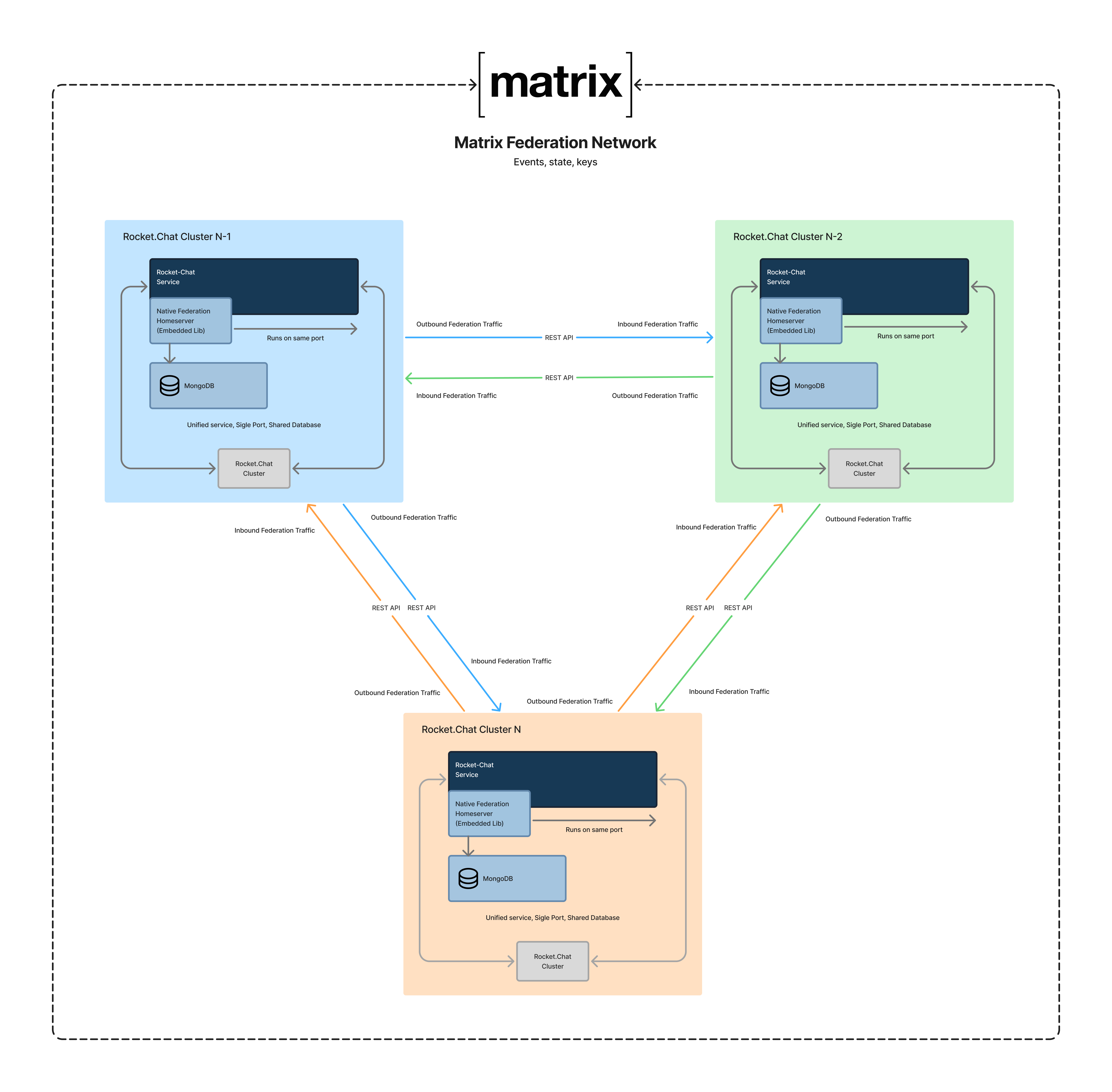
Key capabilities
Rocket.Chat Federation enables cross-server communication using the Matrix protocol. The following capabilities are supported:
Federated features | Supported capabilities |
|---|---|
Messaging | Send, receive, edit, and delete messages across federated servers, with consistent delivery and synchronization. |
Message interactions | Federation aims to support a wide range of message interaction features to keep conversations consistent across homeservers.
|
Direct messaging across servers | Start one-to-one conversations with users on external domains with full invitation handling and membership lifecycle support. |
Typing indicators | Federated rooms may display typing indicators when remote users are composing a message. |
Group rooms | Create rooms containing both local and remote users, with synchronized membership events. |
Invitations | Invite remote users to direct messages and group rooms. Invitation acceptance, decline, and membership updates are synchronized across all participating servers. |
Remote user profiles | Display names and avatars of federated (remote) users are automatically fetched and cached locally. This ensures remote participants are recognizable in conversations, with profile data refreshed as needed to stay up to date. |
Banned users | Manage access by banning users from federated rooms. Banned users are removed from the room, cannot interact or rejoin unless unbanned, and can be managed from the dedicated Banned Users list in the room menu. |
Read receipts | Federated rooms support cross-domain read receipts using Matrix |
Room management | Update room details, such as name and topic, and synchronize changes across federated servers. |
Room role & membership synchronization | Maintain consistent roles and membership across homeservers, including owners, moderators, and members. |
File sharing | Share files between federated users. |
Current limitations
The following table summarizes key limitations users and administrators should be aware of:
Area | Limitation | Details |
|---|---|---|
End-to-End Encryption | Not supported | Encrypted rooms and messages cannot be exchanged between federated servers. |
Public room discovery | Not supported | Searching or browsing public rooms hosted on other homeservers is unavailable. |
Message history backfill | Partial/configurable support not available | Remote users can access existing room history after joining, but administrators cannot yet control or restrict whether history is visible to newly joined users. History access is always enabled until configuration options are introduced. |
Voice/video calls | Not supported | Audio and video calling are disabled in federated rooms. |
Auto-translation | Local only | Translated messages do not propagate to remote servers. |
Discussions | Not supported (will be restricted) | While Discussions may currently appear to work in federated rooms, they are not supported by the Matrix protocol and will be disabled in future releases to prevent inconsistent or unreliable behavior. |
Legacy federation (synapse-based) | Not supported | Rooms created under the old external-homeserver approach will not function with Federation. |
Matrix protocol version | Limited | Rocket.Chat provides reliable compatibility with Matrix v1.1, with ongoing improvements to support future versions of the protocol. |
Username management | Username cannot be changed after federation | Once a user participates in federation, their username becomes part of their permanent Matrix ID (MXID). This restriction remains even if federation is later disabled. Changing the username would break identity consistency across federated servers. |
Performance considerations
Federation is still undergoing performance tuning. While core features are functional, certain scenarios may exhibit reduced performance under high load or unstable network conditions.
Large rooms: Very large federated rooms may experience slower message history loading or temporary gaps in the timeline. Performance continues to improve as the system is continuously optimized.
Unstable or intermittent connectivity: During periods of network instability, users may notice brief synchronization delays or minor message delivery inconsistencies. Enhanced resilience for intermittent connectivity is planned for future releases.
Learn more
Explore the full set of Federation guides to configure, manage, and troubleshoot federated communication in Rocket.Chat:
Federation Configuration: Learn how administrators enable and configure Federation, including prerequisites, security considerations, and federation-specific settings.
Create Federated Rooms: Discover how to create federated direct messages and channels that include users from external Rocket.Chat or Matrix-compatible servers.
Invite External Users to Your Rocket.Chat Server: Understand how invitations work for federated users, including invitation states, acceptance or rejection flows, and how to revoke pending invitations.
Federated Room Governance & Permissions: Learn how roles and permissions work in federated rooms, including the responsibilities of owners, moderators, and members across servers.
Federation FAQ: Resolve common federation questions and issues.